

It’s been 25 years since SharePoint was first released to the world. As part of their milestone anniversary event on March 2, 2026, Microsoft announced some major changes to SharePoint, the Knowledge Agent and Viva Connections.
Quick summary
- Microsoft is enhancing the SharePoint app bar, making it more of a destination for the everyday employee and content managers.
- The underlying SharePoint UX is getting a fresh new look with rounded corners on the primary SharePoint canvas.
- The Knowledge Agent, renamed AI in SharePoint, will be fully integrated into SharePoint going forward as the defacto agent experience in SharePoint.
- New flexibility options will allow you to set your intranet home site as the default Viva Connections “fixed” experience or instead you can default to your own custom intranet.
- The Viva Connections app in Microsoft Teams is evolving into the SharePoint app.
Like kids in a candy shop, we love exploring the new and innovative concepts that Microsoft brings to the world of work, and these changes are definitely worth paying attention to, especially if your intranet is based on SharePoint Online. Special shout out to all the talented people at Microsoft who bring these new enhancements to life!
What's changing?
SharePoint app bar
Microsoft is evolving the app bar that you see on the left-hand side of SharePoint to bring more value to both the everyday employee and content creators.
Today, the bar contains a link to your global navigation, My sites, My news, My files, My lists, a link to Viva Connections and a Create button. In the new release, Microsoft has beefed up the capability within each area to create a richer digital workplace experience for employees. My news is getting replaced with Discover. Create is getting split into Publish and Build. My files is evolving into OneDrive.
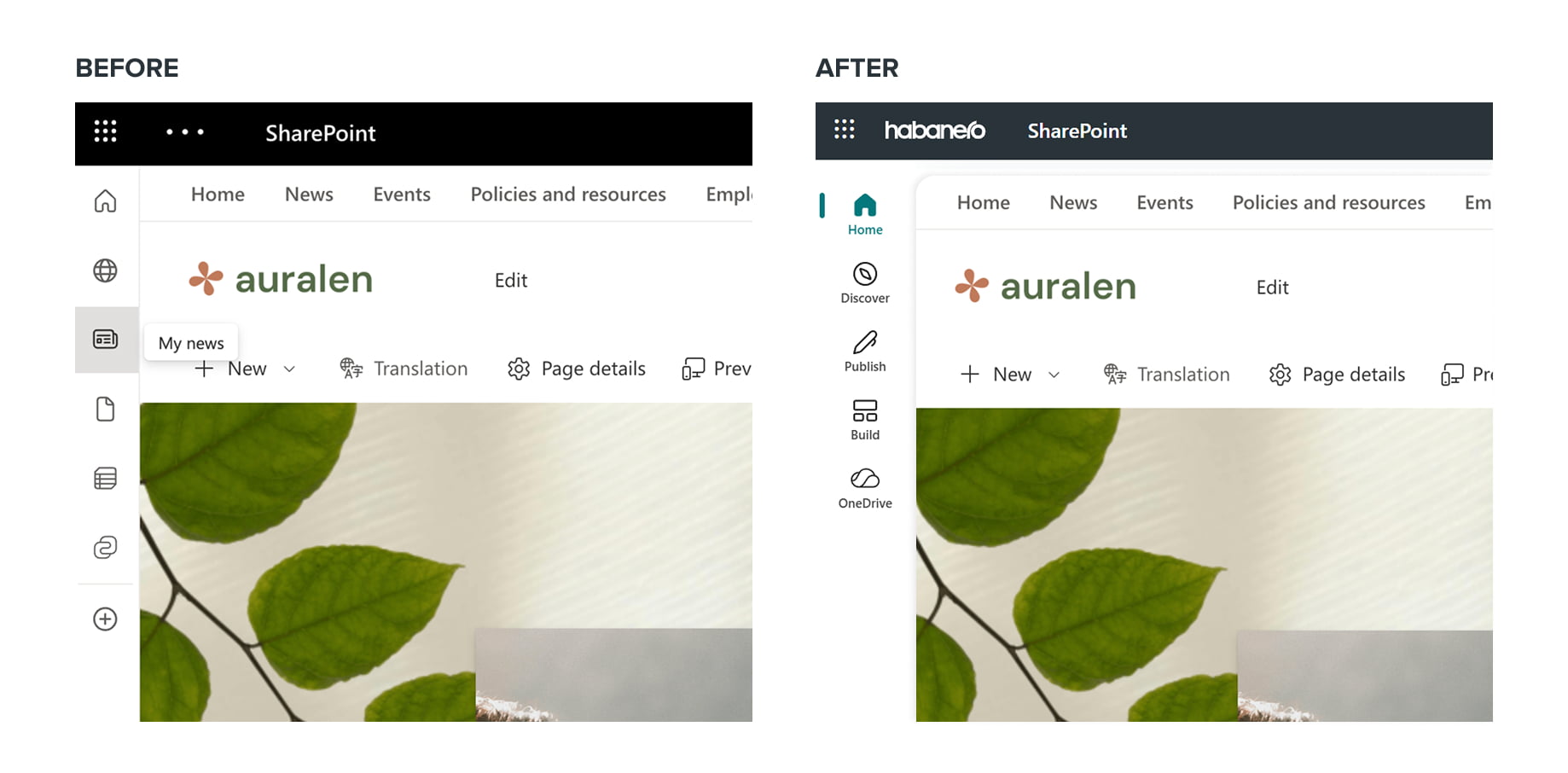
Here’s what you can expect to find within each area of the new SharePoint app bar:
- Home – This links to your company's home site, which can default to either the fixed/vanilla Viva Connections experience or you can instead link to your company’s intranet home site if you’ve invested in a richer enterprise communication and content repository for your employees.
- Discover – This is meant to be a hub to help you discover resources and information directly relevant to your work. Discover is the new default SharePoint start page, helping people see a combination of news, recent activity across sites you visit, updates from coworkers and more.
- Publish – This is a new destination designed to make authoring easier for content authors. They will have easy access to templates and a snapshot view of the posts they are authoring, whether news posts, pages or other publications.
- Build – Just as it sounds, this is a new place to start building new sites, lists, document libraries and agents.
- OneDrive – As you’d expect, this is a view into your OneDrive content, but it also allows you to browse content by people, meetings, or media.
Improvements to SharePoint’s UX design
In addition to the evolution of the SharePoint app bar, Microsoft has made some incremental improvements to SharePoint’s overall look and feel to improve visual focus.
SharePoint’s primary experience through the browser and Microsoft Teams desktop experience includes a new canvas with rounded corners. It's a subtle enhancement, but we really like it as it brings new depth to the page and lifts the primary homepage closer to the user as a visual effect.

Viva Connections is getting more flexible!
Perhaps the most exciting changes are what’s coming to Viva Connections!
New desktop and mobile experience
Viva Connections will come with the option of defaulting to the fixed/vanilla Connections experience (Filmstrip, Dashboard), or instead you can default it to your organization’s home site (also known as your intranet homepage). This is a huge update and really opens the door for any company that has a SharePoint intranet as they can default the mobile app experience to the homepage.
Currently in Viva Connections, the default experience is to the Dashboard and you can navigate over to News from there to see a full list of all your news articles. This makes sense for some organizations, but for many Internal Communicators, they prefer to default the mobile experience to their intranet. That is now possible!
With the new updates, companies can default to their full-fidelity intranet experience, and the app provides full navigation to any site or page within your intranet. You still have the benefit of accessing the Dashboard or News pills/navigation at the top. This is a win-win and will provide a lot of flexibility for organizations to tailor content to both their office and field employees at the same time.
How to set this up in your home site:
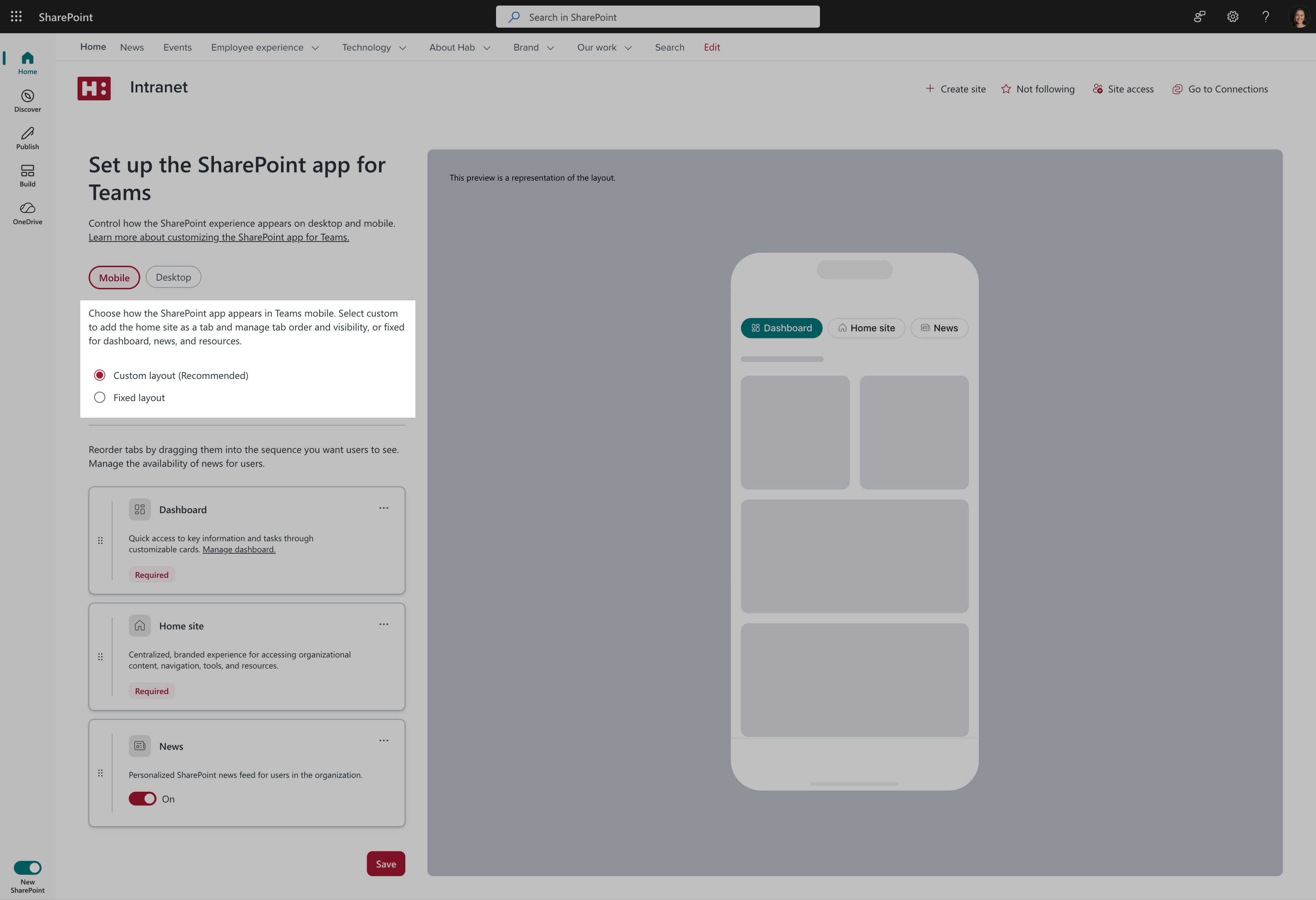
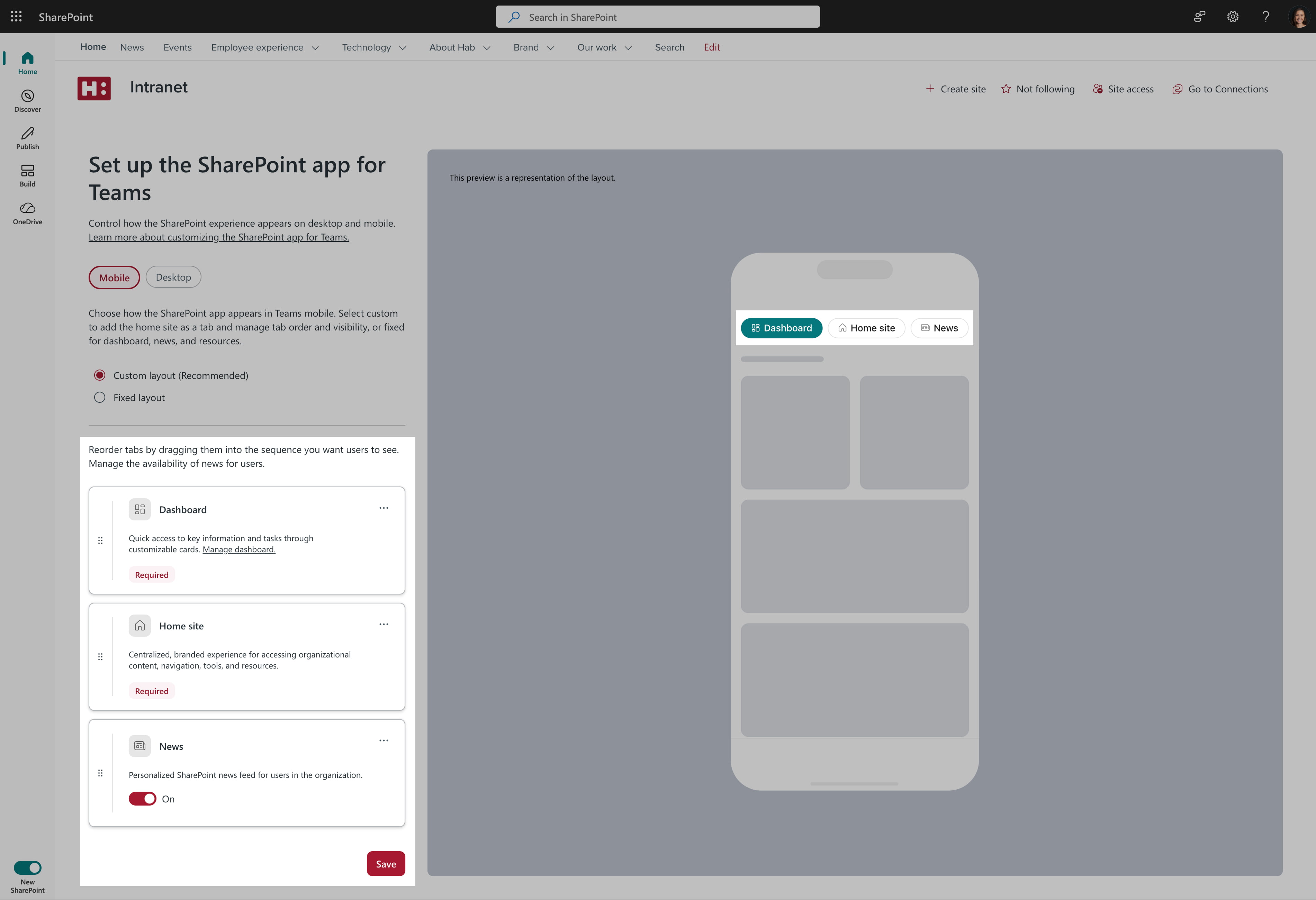
- Go to Settings > Manage home site.
- Choose Set up experience under SharePoint app for Teams.
- Change the layout (custom or fixed layout).
![]()
- Re-order the navigation tabs to best suit their users.
![]()
When can you expect to see these enhancements in your tenant?
Microsoft announced that many of these changes are being introduced through a public preview window that starts immediately in March 2026. By signing-up for the public preview of either the new SharePoint experience or AI in SharePoint, you will be registering your intent to receive these changes into your organization’s Microsoft 365 tenant. Microsoft will promote the new features as they become ready and you will have the chance to start using them as part of the global roll-out. If you are interested in signing your organization up to join the public preview, visit either of these pages to learn more about how it works and sign-up to register with Microsoft.
Public previews:
- Try the new SharePoint experience in public preview today
- Try the AI in SharePoint experience in public preview today
For more information, you can view deeper insights, updates, a demo and videos from Microsoft’s SharePoint Blog: